
Post Name

Finding the right replacement key for your roof rack doesn't have to be a nightmare — if you know where to look.

Whether you've lost your Thule key on a ski trip, snapped a Mont Blanc key in the lock, or simply want a spare before disaster strikes, this guide covers everything: how roof rack key systems work, how to find your key code, which key fits which brand, and where to order a replacement fast.

How Roof Rack Locking Systems Work

Most roof racks — Thule, Yakima, Mont Blanc, Whispbar — use a barrel-style lock cylinder operated by a small, flat-profile key. Unlike car keys, these keys are not electronically coded. They are purely mechanical, which means replacement is straightforward — provided you know your key code.

The code is stamped directly onto the lock cylinder or listed in your rack's original documentation. That code tells the manufacturer (and a replacement supplier) exactly which key blank to cut.

No code? You still have options. More on that below.

The Four Most Common Roof Rack Key Brands

Thule

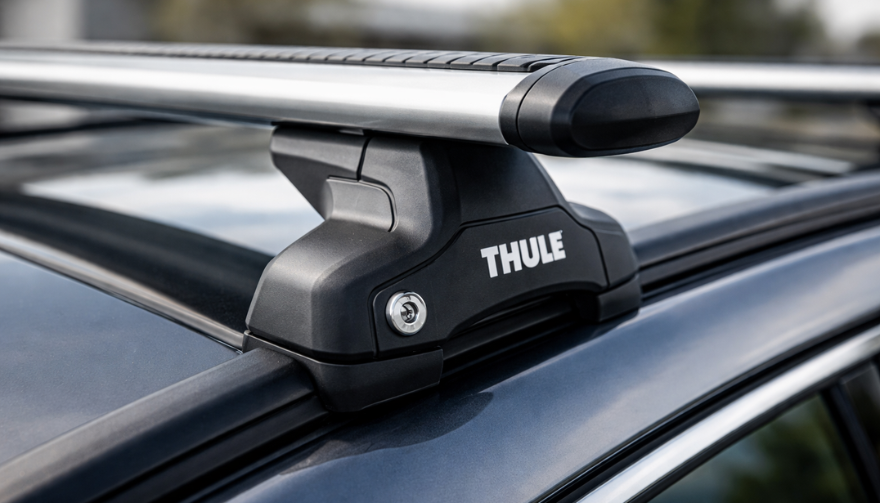
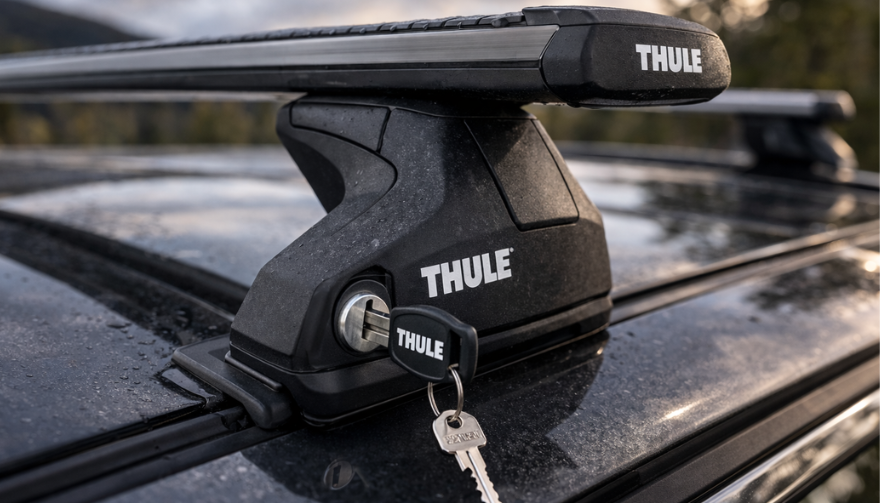
Thule is the dominant brand in Europe and North America. Their lock systems use the N-series key codes (e.g. N001–N200+), clearly stamped on the lock barrel. Thule One-Key System locks share a single user-chosen code across all lock points — a major convenience and a reason to keep a spare.

Key types: flat, small-profile, often with a distinctive squared bow.

See our full guide: [Thule Roof Rack Key Replacement: How to Find Your Code and Order the Right Key]

Yakima

Yakima uses a SKS (Same Key System) — one key code operates all locks on your rack. Codes are typically found on the lock core itself. Yakima keys have a round bow profile and a distinct blade pattern.

Popular code ranges: SKS-101 through SKS-132 and beyond.

Mont Blanc

Mont Blanc roof racks are common across Europe. Their keys use a numeric code system printed on a small sticker inside the lock or on a code card supplied at purchase. Many Mont Blanc keys share profiles with generic "FO" or "MB" series blanks.

GIVI and Other Brands

GIVI produces roof boxes and racks primarily for the motorcycle and touring market. Key codes are typically found on the product label or lock face. Other brands — Kamei, G3, Farad — often use ISO-standard barrel profiles with numeric codes.
How to Find Your Roof Rack Key Code

This is the single most important step. Without the code, you cannot order the correct replacement key.

Check these locations in order:

  1. The lock barrel itself — most manufacturers stamp the code directly on the visible face of the lock cylinder
  2. Your original paperwork — the key card or code card supplied at point of sale
  3. The rack manufacturer's website — some brands (Thule, Yakima) offer code lookup tools using serial number
  4. Receipt or order confirmation — if you registered your rack online, the code may be on file
  5. A locksmith or rack dealer — they can sometimes decode the lock visually or by impressioning

If you cannot find the code and the lock is accessible, a specialist supplier can often identify the correct key from photos of the lock face.

Can You Replace a Roof Rack Lock Without the Key Code?

Yes — but it requires more steps.

Option 1: Lock replacement. Order a new lock cylinder for your rack model. You'll get a new key with it. This costs more but solves the problem completely.

Option 2: Locksmith decoding. A locksmith can decode the existing lock and cut a matching key — useful when the lock is still in place and functional.

Option 3: Contact the manufacturer. Thule and Yakima both have customer service processes for lost key codes, particularly if you registered the product.

Option 4: Photo identification. Send a clear photo of the lock face to a specialist supplier. Experienced teams can identify the key code from the keyway profile and stamping.

Spare Keys: Why You Need One Before You Need One

The worst time to discover you need a roof rack key is standing in a car park with a loaded bike rack you can't unlock.

A replacement key from mr-key.com typically costs under €10. A locksmith call-out, a wasted trip, or a full lock replacement costs far more.

Buy a spare when:

  • You've just purchased a second-hand rack with only one key
  • You're heading on a long trip with expensive cargo
  • You're lending the rack to someone else
  • You've already lost one key once

Keep the spare somewhere separate from your main key — not on the same keyring.

Ordering the Right Key: A Step-by-Step Checklist

Before you order, confirm:

  • Brand — Thule, Yakima, Mont Blanc, GIVI, other
  • Key code — stamped on lock or from documentation
  • Quantity — one replacement or two (spare included)
  • Lock type — some racks have two lock types (e.g. foot lock + bar lock with different codes)

If you're ordering for a Thule One-Key System, confirm whether the code covers all your lock points or just one.

Roof Rack Key Replacement: What It Costs

Mechanical roof rack keys are not expensive. A correctly coded replacement from a specialist supplier typically costs €5–€15 per key, depending on brand and profile.

Avoid generic "universal" keys — they don't exist for barrel-style rack locks. The code is specific. An incorrectly matched key will not turn the cylinder.

Full lock cylinder replacements cost more — typically €20–€50 per lock point — but are sometimes the only option when the code is completely unknown.

FAQ

Q: Can I use a car key cutting machine to cut a roof rack key? A: Yes — most roof rack keys use standard key blanks that any key cutting machine can handle. The critical input is the correct key code for your brand and model.

Q: My Thule lock says N121 — what key do I need? A: You need a Thule N121 replacement key. This is a specific code in Thule's N-series range. Search by this exact code when ordering.

Q: Are Thule and Yakima keys interchangeable? A: No. Thule and Yakima use different keyway profiles. A Thule key will not operate a Yakima lock and vice versa.

Q: How many keys does a Thule One-Key System come with? A: Typically two keys per lock set. If you've lost both, you'll need to order by the N-series code stamped on the lock face.

Q: Can I order a roof rack key without the code? A: It's difficult but not impossible. Send a clear photo of your lock face to a specialist supplier. Some brands also offer code lookup via registered serial number.

Q: How long does replacement key delivery take? A: From mr-key.com, most European destinations receive orders within 2–5 business days depending on country and carrier.

Q: What if the wrong key arrives? A: A reputable supplier will exchange or refund. Always double-check the code before ordering to avoid this.

Q: Is it safe to store my key code somewhere? A: Yes — photograph the code stamped on your lock and save it to cloud storage. This makes future replacements instant.

Order Your Roof Rack Replacement Key Today

You now know exactly what you need. Don't wait until you're locked out on the roadside.

Visit mr-key.com to find your replacement roof rack key by brand and code. We stock keys for Thule, Yakima, Mont Blanc, GIVI, and more — shipped across Europe within days.
Shop Roof Rack Replacement Keys at mr-key.com

Related Posts

How Long Does a Car Key Battery Last? Can You Use a CR2025 Instead of a CR2032?

How Long Does a Car Key Battery Last? Can You Use a CR2025 Instead of a CR2032?

When was the last time you thought about the battery inside your car key? For most drivers, the answer is probably never—until the key suddenly stops working. A car key battery is a small but essential part of modern driving. It powers keyless entry, remote locking, and in many cases, keyless ignition systems. When the battery fails, it can leave you locked out of your car or stranded in inconvenient situations. Understanding how long a car key battery typically lasts and knowing when and how to replace it can save you time, money, and unnecessary frustration. In this detailed guide, you will learn how long a typical car key battery lasts, what factors shorten its life, the most common signs that your battery needs replacement, and whether you can substitute a CR2025 for a CR2032 battery in your car key fob. How Long Does a Car Key Battery Last? The average car key battery lasts between two to four years. However, the actual lifespan of your key battery depends on several factors, including how often you use the key, whether your car uses a proximity key system, the type of battery installed, the climate where you live, and the quality of the battery brand. If your car has a keyless entry system or keyless ignition that constantly communicates with your vehicle when nearby, your battery may drain more quickly. Frequent use—such as multiple lock and unlock cycles each day—also leads to faster battery depletion. What Can Shorten the Life of Your Car Key Battery? Frequent Use: Keys that are used many times per day will naturally consume more battery power. Keyless Proximity Systems: Smart keys that communicate continuously with the vehicle tend to use more energy. Extreme Temperatures: Exposure to both heat and cold can degrade battery performance and lifespan. Low-Quality Batteries: Cheap, no-name batteries often have a shorter life and can fail unexpectedly. Many drivers wait for their key to stop working before replacing the battery, but it is recommended to replace it proactively every one to two years to avoid surprise failures, especially before long trips or the winter season. Signs That Your Car Key Battery Is Failing Your car key usually gives warning signs before the battery completely dies. Knowing these symptoms can help you avoid being caught in an inconvenient situation. Reduced Range: You may need to stand closer to your car for the key to work properly. Delayed Response: The car may not immediately lock or unlock when you press the button. Intermittent Operation: Sometimes the key works, sometimes it does not. Dashboard Alerts: Some vehicles display a "low key battery" warning on the dashboard. Complete Failure: If ignored, the key will eventually stop working entirely. If you notice any of these warning signs, it is best to replace the battery immediately to ensure continuous, reliable operation. When Should You Change Your Car Key Battery? The best time to change your car key battery is before it fully fails. Most experts recommend replacing the battery every two years as preventive maintenance. You should also replace the battery immediately if you notice that your key’s range has reduced or if it sometimes stops working without warning. Seasonal changes also play a role. During winter, cold temperatures can reduce battery performance significantly, which is why it is wise to replace your battery before the onset of cold weather. Additionally, if you are planning a long trip or vacation, it is a good idea to install a new battery beforehand to avoid potential inconvenience. Can You Use a CR2025 Instead of a CR2032 Battery in a Car Key? One of the most common questions drivers ask is whether a CR2025 battery can be used as a substitute for a CR2032 in a car key fob. Although the two batteries are similar in many ways, there are critical differences to consider. CR2025 vs. CR2032: What Is the Difference? Both the CR2025 and CR2032 batteries are 3-volt lithium coin cells and have the same diameter of 20 millimeters. However, their thickness and capacity differ. Feature CR2025 CR2032 Diameter 20 mm 20 mm Thickness 2.5 mm 3.2 mm Voltage 3 volts 3 volts Capacity Approximately 150 mAh Approximately 220 mAh The CR2032 is thicker and has a higher energy capacity, meaning it will typically last longer than a CR2025 in the same device. Can a CR2025 Fit in a CR2032 Slot? Technically, a CR2025 can physically fit into a car key fob designed for a CR2032 battery because they have the same diameter. However, because the CR2025 is thinner, it may not make stable contact with the battery terminals inside the key. Some people attempt to compensate for the thinner battery by adding a small piece of paper, cardboard, or aluminum foil to hold it in place. Although this may temporarily restore functionality in an emergency, it is not a reliable or recommended solution for long-term use. Should You Use a CR2025 Instead of a CR2032? The short answer is that using a CR2025 in place of a CR2032 is acceptable as a temporary, emergency solution but is not advisable as a permanent fix. Using the incorrect battery size can lead to poor contact, inconsistent performance, and a much shorter operating life. Risks of Using the Wrong Battery: Unstable contact may cause the key to work intermittently. Lower battery capacity means the key will require more frequent battery replacements. A loose battery inside the fob can shift during handling, potentially damaging the internal components. For long-term reliability and to protect your car key from unnecessary wear, it is always best to use the exact battery size specified for your key fob. Where to Buy the Right Car Key Battery If you are looking for a high-quality CR2032 battery for your car key, Mr Key offers reliable options from trusted brands such as Panasonic. Choosing a premium battery will ensure your key functions properly for as long as possible and reduces the risk of sudden failure. Mr Key also provides a wide range of car key shells, key fobs, and accessories compatible with popular brands like Peugeot, Citroën, Nissan, Suzuki, Fiat, Ford, and more. Whether you need to replace the battery, the shell, or the entire key, Mr Key can help you find the right product at an affordable price. You can browse the full selection in the Mr Key online store and get the parts you need delivered directly to your door. Car key batteries are often forgotten until they stop working, but with proper care and timely replacement, you can avoid the inconvenience of being locked out or dealing with a non-functional key. Understanding how long a car key battery typically lasts and knowing the signs of failure can help you stay ahead of the problem. While a CR2025 battery can sometimes be used in an emergency, the CR2032 is the correct and recommended option for most car key fobs due to its longer life and better fit. Using the right battery size ensures that your key works reliably, protects your key's internal components, and provides peace of mind. Regularly check your key, replace the battery proactively, and always use the correct parts for the best performance. When you need a new battery or key shell, Mr Key is your trusted partner for fast, easy, and affordable car key repairs.

Car Ignition Switch Problems: Symptoms, Causes, and Replacement Guide

Car Ignition Switch Problems: Symptoms, Causes, and Replacement Guide

The ignition switch is one of the most important electrical components in any car. When it starts to fail, the symptoms can appear suddenly, seem unrelated, and quickly leave you stranded. This guide explains the real-world signs , the common causes , the most accurate diagnosis steps , and a clear ignition switch replacement guide that helps any driver understand what’s happening and what to do next. If you’re dealing with car ignition lock problems , this article gives you the clarity you need to fix the issue fast and safely. What the Ignition Switch Actually Does The ignition switch has two critical jobs: 1. Electrical power distribution It sends power to the dashboard, fuel pump, ignition system, starter motor, and electronic modules. 2. Starting the engine When you turn the key (or press the button), it bridges electrical circuits, enabling the starter motor to crank the engine. When the ignition switch begins failing, even slightly, it disrupts these circuits. That’s why symptoms can range from flickering dash lights to complete engine shutdown. Symptoms of a Failing Ignition Switch These are the most common, proven symptoms that mechanics use to identify ignition switch problems. 1. Car Won’t Start or Cranks Intermittently If turning the key does nothing—or the engine cranks sometimes but not always—the ignition switch may not be sending power consistently to the starter relay. Typical behavior includes: Silence when turning the key Clicks but no cranking Starts only after multiple attempts Total power loss during cranking This is one of the most classic ignition switch symptoms. 2. Stalling While Driving A failing ignition switch can cut power to the engine while you’re moving . Common signs: Sudden stall for no reason All dash lights go off instantly Engine dies when hitting bumps Engine cuts out but restarts immediately This is dangerous and needs urgent attention. 3. Dashboard Lights Flickering or Turning Off When the internal contacts inside the switch wear out, they create tiny power interruptions. You may see: Speedometer drops to zero Warning lights randomly appear Interior electronics momentarily cut out Radio resets or flickers These short power losses are a major red flag. 4. Key Feels Hot or Hard to Turn If the key is warm after driving, the switch may be overheating internally. If the key becomes difficult to rotate, the ignition cylinder (mechanical part) may be worn — which often leads to switch failure later. 5. Accessories Don’t Work in ACC Mode If turning the key to ACC does not activate: radio wipers power windows heater fan …the accessory circuit inside the switch may be failing. 6. No Sound from the Fuel Pump When Turning the Key You should hear a soft humming for 1–2 seconds. If you don’t, it may mean the ignition switch isn’t powering the pump relay. What Causes Ignition Switch Problems? Ignition switches fail for predictable and well-documented reasons. 1. Internal Wear Over Time Inside the ignition switch are metal contact plates . After thousands of cycles, these contacts burn, corrode, or lose tension. Symptoms develop slowly: random stalling needing to wiggle the key intermittent power This is the most common cause. 2. Heavy Keychains Many drivers don’t realise this: A heavy keychain constantly pulls on the ignition cylinder. Over years, this causes: internal looseness misalignment premature switch failure If your keychain has more than a few items, it may be contributing. 3. Heat and Electrical Overload Faulty relays, worn fuel pumps, or aftermarket accessories can overload the ignition switch. Excess heat damages the internal copper contacts, causing: hot key symptoms partial circuit failure total switch burnout 4. Moisture or Dirt in the Cylinder Moisture or dust causes the mechanical part of the ignition to jam or bind. This forces extra pressure onto the switch every time the key turns. 5. Faulty Key or Worn Key Blade If your key doesn’t rotate smoothly, it can damage both the cylinder and the switch . Worn keys often lead to electrical faults later. How to Diagnose Ignition Switch Problems Accurately Before replacing parts, you should confirm the ignition switch is truly the issue. These steps follow the same logic professional mechanics use. 1. Check if Dashboard Lights Turn On Turn the key to ON without starting the engine. If: no lights come on lights flicker radio stays off …the ignition switch might not be sending voltage. 2. Try Starting with Accessories On Turn the key to ACC. If the accessories work in ACC but the engine won’t start, the “start circuit” inside the ignition switch may be failing. 3. Wiggle Test Gently wiggle the key while: trying to start with ACC on with the engine idling If wiggling makes electronics turn on/off, the switch is internally worn. 4. Bump Test While Driving If the car stalls when hitting bumps or potholes, the switch is losing internal contact momentarily. This is one of the strongest indicators of a failing switch. 5. Test Voltage at the Ignition Switch (Advanced) Using a multimeter, check for: constant power switched power accessory power start signal power If any circuit fails randomly, it confirms an ignition switch fault. If you need a safety reference for electrical testing, you can check the UK Government’s general vehicle safety guidance here: Prevention: How to Avoid Ignition Switch Problems Ignition switch failures can often be prevented with small habits. 1. Keep Your Keychain Light Remove heavy accessories. This reduces stress on the ignition cylinder and switch dramatically. 2. Avoid Resting Hands on the Key While Driving Constant pressure on the key twists the internal contacts. 3. Only Use Correct, Undamaged Keys Bent, cracked, or worn keys can damage: the cylinder the switch the steering lock If your key is worn, replace it before it causes further problems. 4. Address Electrical Problems Early A failing alternator, weak battery, or short circuits can overload the ignition switch. If you notice dim headlights or battery warnings, fix those early. 5. Keep Dust and Moisture Out of the Cylinder Avoid spraying WD-40 or household lubricants into the ignition—it attracts dust. Use proper graphite lock lubricant if needed. Ignition Switch Replacement Guide You should only replace the ignition switch if diagnosis confirms it. Below is a clear replacement overview used by both DIYers and technicians. Note: Procedures vary by vehicle, but the overall steps are similar. 1. Disconnect the Battery Always disconnect the negative terminal. This prevents: accidental airbag deployment electrical shorts damage to modules 2. Remove Steering Column Covers Most cars use simple screws underneath. Once removed, the top and bottom covers split apart. 3. Locate the Ignition Switch Module It is usually mounted behind the ignition cylinder. Depending on the car: it may be held by two screws or secured with clips or integrated into a combined steering lock module 4. Remove the Electrical Connector Ignition switches usually have one large multi-pin connector. Release the locking tab and pull it gently. 5. Remove and Replace the Switch Install the new switch in the exact orientation as the old one. Common mistakes to avoid: misaligning the switch’s internal slot tightening screws unevenly damaging wiring during removal 6. Reassemble and Test Thoroughly After reassembly, test: ACC mode ON mode engine start headlights indicators wipers radio If everything works consistently, the replacement is successful. Is It Safe to Drive with a Bad Ignition Switch? Usually no . A failing ignition switch can: stall the engine suddenly disable power steering shutdown ABS cut power to headlights at night The RAC warns that electrical failures causing engine cut-outs are a serious safety risk. If your switch is failing, get it inspected immediately. FAQ: Car Ignition Switch Problems 1. How much does ignition switch replacement cost? Most replacements cost £80–£300 depending on the vehicle. Some modern cars require coding, making the cost higher. 2. Can a bad ignition switch cause the car to stall? Yes. Loss of electrical contact in the switch can cut power to the engine instantly. 3. Is a failing ignition switch the same as a bad starter? No. A bad starter prevents the engine from cranking. A bad ignition switch prevents power from reaching the starter or other systems. 4. Can a locksmith replace an ignition switch? In many cases, yes — especially for older vehicles. For modern immobilizer systems, a vehicle technician may be required. 5. Can I drive with ignition switch problems? It’s unsafe. The engine can cut out while driving, especially on bumps or turns. 6. Does a bad ignition switch affect accessories only? It can affect: accessories engine start fuel pump dashboard power ECU communication It depends on which internal circuit fails. 7. What’s the lifespan of an ignition switch? Most last between 10–15 years , depending on usage and electrical load. 8. Do push-button cars have ignition switches? Yes — they use an electronic ignition switch module instead of a mechanical one. Failure symptoms are similar. 9. What does a worn key have to do with ignition switch problems? A badly worn key can cause mechanical strain on the cylinder, which then stresses the electrical switch linked behind it. 10. Can I prevent ignition switch issues? Yes — keep your keychain light, avoid forcing the key, and keep electrical systems maintained. For high-quality replacement automotive parts and spare key, visit our shop at mr-key.com .

How to Install a Hydrogel Navigation Screen Protector

How to Install a Hydrogel Navigation Screen Protector

Nowadays car interiors rely heavily on touchscreens. Whether you drive a BMW 3 Series , VW Golf , Audi A4 , Mercedes A-Class , Peugeot 3008 , or Skoda Octavia , your infotainment display is the centre of navigation, settings, entertainment and safety features. But these screens are also fragile—prone to scratches , fingerprints , micro-abrasions , and glare . A hydrogel navigation screen protector is one of the best ways to protect your car touchscreen without affecting clarity or touch sensitivity. This guide shows you exactly how to install a hydrogel protector , step by step, with expert tips, mistakes to avoid, and a few insider tricks that most guides miss. What Is a Hydrogel Screen Protector? Hydrogel is a soft, self-healing, flexible material used widely in phone protection and now increasingly in automotive displays. Unlike tempered glass, it adapts to curved edges and eliminates small bubbles over time. For more technical background, you can read the scientific definition on hydrogels Hydrogel is ideal for infotainment screen protection because it: Reduces glare Absorbs micro-scratches Maintains full touch sensitivity Adapts to curved and angled car screens Self-heals small marks over 24–48 hours It’s especially useful for European cars where screens are large and glossy, such as: Mercedes MBUX screens (A-Class, C-Class, GLC) Volkswagen MIB systems (Golf, Passat, Tiguan) BMW iDrive displays (3 Series, X1, X3) Audi MMI touchscreens (A4, A3, Q5) Peugeot i-Cockpit models Renault Clio, Captur, Megane Skoda Octavia, Superb, Scala Curious which specific models benefit the most from hydrogel protection? Check out our full guide on which cars benefit most from hydrogel navigation protection . Before You Start: Essential Preparation Installing a hydrogel protector takes only a few minutes, but the preparation stage determines whether the final result looks factory-perfect . You Will Need Hydrogel screen protector Microfiber cloth Screen-cleaning wipe (wet & dry) Dust-removal sticker (optional but recommended) Small squeegee / card Choose the Right Environment Install the protector in: A dust-free space (car parked indoors is ideal) Soft lighting (so dust particles are visible) A still environment (no wind, no blowing air) Avoid doing it outside or while standing near open windows. Step-by-Step: How to Install a Hydrogel Navigation Screen Protector 1. Clean the Navigation Screen Thoroughly Use a wet wipe first, then a dry microfiber cloth. Focus on: Corners Edges Around the frame Any oily fingerprints Tip: Turn the screen off to see dust more easily. 2. Remove All Dust Particles Even one small dust speck can create a permanent bubble. Use: Dust-removal stickers A clean microfiber cloth Hold the screen at an angle and look under the light. If perfectionism matters anywhere, it’s here. 3. Peel the First Protective Layer Most hydrogel protectors have two layers . Peel Layer 1 halfway and align the protector with: Left and right edges Upper frame Any curved edges Do not peel it completely yet. 4. Align and Apply the Protector Once aligned: Press the top centre gently Slowly drag your finger downward Peel off the rest of Layer 1 as you go The film will naturally stick without much force. 5. Use the Squeegee to Push Out Air Work from centre outward , using firm but controlled pressure. Hydrogel is self-healing , so small micro-bubbles usually disappear within 24–48 hours . 6. Remove the Final Top Layer After application: Peel Layer 2 from one corner Pull slowly to avoid lifting the protector This reveals a glossy, clear surface below. 7. Allow 24 Hours for Full Adhesion Do not touch the screen too much during this period. Avoid: Heat exposure Cleaning sprays Aggressive pressing Hydrogel needs time to “settle” and self-heal. Common Mistakes to Avoid Even a perfect protector can be ruined by simple errors. Installing in a dusty environment Fibres, dust and hair easily get trapped. Touching the sticky side This leaves permanent marks. Rushing the alignment Hydrogel is flexible but not stretch-proof. Cleaning with alcohol after installation This can damage the outer coating. Installing on a hot screen Heat weakens adhesion and causes micro-bubbles. For a complete walkthrough , see our guide on how to protect your car’s navigation screen . Why Hydrogel Is Better Than Tempered Glass for Car Screens Tempered glass works well for smartphones—but not for car navigation screens. Hydrogel performs better because: It bends and adapts to curved displays It doesn’t create raised edges It avoids touchscreen sensitivity issues It self-heals micro-abrasions It provides better Anti-Glare performance If you want to see more in depth guide on why hydrogel protectors are better check out our guide on Hydrogel vs Tempered Glass Navigation Protectors Comparison FAQs 1. Does a hydrogel protector reduce screen sensitivity No. Hydrogel maintains full touch responsiveness because the material is soft and pressure-adaptive. 2. Can I reuse a hydrogel screen protector? No. Once removed, it cannot be reinstalled cleanly. 3. How long do micro-bubbles take to disappear? Usually 24–48 hours. Stubborn ones may take up to 72 hours if the screen is curved. 4. Will the protector affect brightness or clarity? High-quality hydrogel preserves original screen clarity. Matte versions reduce glare but may slightly soften reflections. 5. Is hydrogel safe for anti-reflective or coated screens? Yes. Hydrogel adhesive is gentle and does not damage coatings. If you want premium hydrogel protectors for BMW, Audi, Mercedes, VW, Peugeot, Renault, Skoda and more, explore our full selection today. Visit our shop at mr-key.com Related Guides Which cars benefit most from hydrogel navigation protection How to Protect Your Car’s Navigation Screen from Scratches,Glare & Fingerprints Hydrogel vs Tempered Glass Navigation Protectors Comparison

The Journey of Car Keys: From Metal to Modern Tech

The Journey of Car Keys: From Metal to Modern Tech

Car keys have come a long way from simple metal tools to advanced digital systems. This evolution reflects the advancements in automotive security, convenience, and technology. Understanding the history of car keys gives you a better appreciation of the tools you use to unlock, start, and secure your vehicle. Here’s a look at how car keys have transformed over the years. 1. The Humble Beginnings: Metal Keys The story of car keys began with simple, unassuming metal keys designed to manually lock and unlock car doors. How They Worked: These keys were physical tools that matched a mechanical lock’s configuration. Challenges: Lost keys or broken locks often required professional locksmiths for replacements or repairs. Impact: Metal keys, while functional, offered little in terms of advanced security or convenience. Though basic, these keys laid the groundwork for innovations to come. 2. Entering the Electronic Era: Remote Keys The next big leap in car key evolution came with the introduction of remote keys in the 1980s. These keys added a layer of convenience and functionality. Features: Remote locking and unlocking. Panic buttons for emergencies. Integration with car alarms for added security. Advantages: No more fumbling for locks in the dark; a simple press of a button provided instant access. Drawbacks: Batteries needed frequent replacement, and repairs were more complex than with traditional metal keys. Remote keys quickly became a standard feature for modern vehicles. 3. The Smart Key Revolution By the late 1990s and early 2000s, smart keys emerged, transforming how you interacted with your car. How They Worked: These key fobs used radio signals to communicate with your car, allowing for keyless entry and push-button starts. Benefits: Enhanced security with encrypted signals. Increased convenience with no need to insert a key into the ignition. Sophisticated design and compact form factors. Limitations: These keys are expensive to replace and require professional programming. Smart keys brought unparalleled convenience but also increased the need for specialized services in case of loss or damage. 4. Integration with Smartphones: Digital Keys In recent years, car key technology has embraced the smartphone revolution, allowing you to unlock and start your car using your mobile device. Features: App-based controls for locking, unlocking, and starting your car. Sharing access with family or friends via the app. Enhanced security with biometric verification like fingerprints or face recognition. Advantages: No physical key needed, making it harder to lose or forget. Considerations: Dependence on phone battery life and app reliability. Digital keys represent the cutting edge of car key technology, blending convenience with advanced security features. 5. Biometric Car Keys: The Future of Security Biometric keys are poised to redefine vehicle access with unmatched security and personalization. How They Work: These systems rely on fingerprint or facial recognition to verify the user’s identity. Benefits: Impossible to replicate or hack. Fully personalized access. Enhanced theft protection. Challenges: High development costs and limited availability in mainstream vehicles. Biometric keys are still in their infancy but hint at a future where cars are more secure than ever. 6. Why Understanding Key Evolution Matters Knowing how car keys have evolved helps you make informed decisions when it’s time to replace or upgrade. Cost Considerations: From simple metal keys to advanced digital systems, replacement costs vary significantly. Security Features: Understanding the security features of your key can help you prevent theft and unauthorized access. Convenience: Opt for a system that matches your lifestyle, whether it’s a traditional key or an app-based digital solution. The more you know, the better equipped you are to choose the right key for your vehicle. Pro Tips for Key Replacement and Maintenance Backup Keys: Always keep a spare key in a safe location. Battery Checks: Replace key fob batteries regularly to avoid sudden malfunctions. Professional Help: Seek professional assistance for programming smart or digital keys. Protect Your Keys: Use a key cover to prevent wear and tear. Proper maintenance ensures your car key remains functional and reliable for years to come. From the simplicity of metal keys to the sophistication of biometric access, car key technology continues to evolve. Each advancement brings greater security, convenience, and innovation, making life easier for car owners like you. Whether you’re replacing a key or exploring the latest tech, understanding this evolution helps you stay ahead in the world of automotive technology.

Chat with us