Post Name


Losing or encountering issues with your car key can feel like a nightmare, especially when you’re in a hurry. From unresponsive key fobs to stuck keys, these problems are more common than you might think. The good news? Most of these issues have simple, affordable fixes that you can address quickly. This guide will help you identify common car key problems and provide solutions to get you back on track without breaking the bank.

1. Key Won’t Turn in the Ignition

Why It Happens:
When your car key refuses to turn, it’s often due to a worn-out key, a damaged ignition cylinder, or a locked steering wheel.

How to Fix It:

  • Check the Steering Wheel: If the wheel is locked, try gently turning the steering wheel left and right while turning the key in the ignition.
  • Inspect the Key: A bent or worn-out key can cause alignment issues. Try a spare key if you have one.
  • Lubricate the Ignition: Use a small amount of graphite lubricant (avoid oil-based products) to loosen the ignition cylinder.
  • If All Else Fails: Consult a professional to replace the key or ignition lock.

Tip: Avoid forcing the key, as this could damage the ignition further.

2. Car Key Fob Isn’t Responding

Why It Happens:
Modern key fobs are convenient, but they rely on batteries and electronic components that can fail. A dead battery is the most common culprit.

How to Fix It:

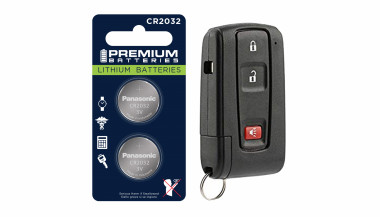
  • Replace the Battery: Open your key fob (usually with a small screwdriver) and swap out the old battery for a fresh one. Most fobs use coin-shaped batteries like CR2032.
  • Reprogram the Key Fob: If changing the battery doesn’t work, your fob may need reprogramming. Follow your car manual’s instructions or consult a professional locksmith.
  • Check for Damage: Inspect the buttons and internal components for signs of wear or moisture.

Tip: Always keep a spare battery on hand to avoid unexpected key fob failures.

3. Key Stuck in the Ignition

Why It Happens:
This issue often stems from a locked transmission, dirt in the ignition, or a worn-out key that doesn’t align properly.

How to Fix It:

  • Ensure the Car Is in Park: For automatic cars, check that the gear shifter is fully in the “Park” position.
  • Clean the Ignition: Use compressed air to remove dirt or debris from the keyhole.
  • Jiggle the Key: Gently wiggle the key while applying light pressure to help free it.
  • Inspect for Damage: If the key is bent, avoid forcing it. A professional can help safely extract it.

Tip: If the problem persists, you may need to replace the ignition cylinder or key to prevent further damage.

4. Worn or Damaged Car Key

Why It Happens:
Over time, constant use can wear down the grooves on your key, making it difficult to start the car or open the doors.

How to Fix It:

  • Get a Duplicate Key: If your key is showing wear, have a duplicate made while it still works.
  • Replace the Key: A locksmith can create a new key based on your car’s lock or key code.
  • Upgrade to a Modern Key: If you’re using an older mechanical key, consider upgrading to a transponder key or key fob for added convenience and security.

Tip: Don’t wait until your key stops working entirely. Replacing a worn key early can save you time and stress.

5. Key Fob Signal Interference

Why It Happens:
Sometimes, your car key fob may not respond due to signal interference from nearby electronics or a faulty antenna.

How to Fix It:

  • Move Away from Interference: Check for other devices nearby, such as Wi-Fi routers or radios, which may disrupt the signal.
  • Inspect the Fob: Ensure the key fob’s battery is working and the buttons are functional.
  • Reset the Key Fob: Follow your car manual’s instructions to reset or resynchronize the fob.
  • Test the Car’s Receiver: If the problem persists, there may be an issue with your car’s signal receiver.

Tip: Parking in a location free from electronic interference can help diagnose if this is the root cause.

Preventing Car Key Problems: Simple Tips

Taking care of your car key now can save you from bigger headaches later. Here are some quick maintenance tips:

  • Keep Keys Clean: Avoid exposing keys to water, dirt, or chemicals.
  • Store Spare Keys Safely: Always have a backup key in a secure and accessible place.
  • Replace Batteries Regularly: Change key fob batteries annually to prevent unexpected failures.
  • Inspect Your Keys: If you notice wear, cracks, or loose buttons, address the issue early.

Why Addressing Car Key Problems Early Saves You Money

Ignoring small car key problems can lead to more expensive repairs down the road. For example:

  • A damaged ignition can cost far more to replace than addressing a stuck key early.
  • Reprogramming a lost or broken key fob is more costly than simply replacing a battery.
  • Getting a duplicate key before the original breaks ensures you’re not left stranded.

By staying proactive, you can keep your car keys functioning smoothly without spending a fortune.


Related Posts

Removing Keys from Locks: A Comprehensive Guide

Removing Keys from Locks: A Comprehensive Guide

Removing a key from a lock may seem simple, but it can become tricky when dealing with stuck or broken keys. Whether you're dealing with a standard lock, padlock, or vehicle ignition, understanding the correct techniques can save you from damage and frustration. This guide will walk you through the essential steps for removing keys from various types of locks, offering practical advice and tips to ensure a smooth process. Common Scenarios and Challenges Keys can become stuck or difficult to remove for several reasons, including misalignment, wear and tear, or damage to the key or lock. Additionally, environmental factors like temperature changes can cause metals to expand or contract, making key removal more challenging. Recognizing the cause of the issue is the first step in effectively addressing it. Basic Techniques for Key Removal Gentle Wiggle and Pull: The first technique to try is a gentle wiggle and pull. Hold the key firmly and move it slightly up and down or side to side while pulling gently. This method works well if the key is simply stuck due to misalignment. Lubrication: If the key is difficult to remove, applying a small amount of graphite powder or a silicone-based lubricant into the keyhole can help. Avoid using oil-based lubricants, as they can attract dirt and grime, potentially worsening the problem. Tapping the Lock: For stubborn cases, lightly tapping the lock with a hammer while gently pulling the key can help dislodge it. This method is effective when the key is stuck due to debris or minor misalignments within the lock. Advanced Techniques for Stuck Keys Using a Key Extractor: If the key is broken off inside the lock, a key extractor tool can be very effective. Insert the tool into the keyhole, hook the broken key piece, and pull it out carefully. This method requires patience and a steady hand. Pliers and Tweezers: If part of the key is still protruding, you can use needle-nose pliers or tweezers to grip and pull the key out. Be careful not to apply too much force, as this can push the key further into the lock or damage the lock mechanism. Heat Application: In cold weather, metal contracts, which can cause the key to get stuck. Gently heating the key with a hairdryer or warm cloth can expand the metal slightly, making it easier to remove. However, avoid using an open flame, as it can damage the lock or key. Preventing Key Stuck Issues Prevention is always better than cure. Here are some tips to prevent keys from getting stuck in the future: Regular Maintenance: Keep your locks and keys clean and well-lubricated with appropriate materials. Regularly inspect for wear and tear, and replace any damaged keys or locks. Use Duplicate Keys: If you notice a key becoming difficult to use, have a duplicate made before it breaks or becomes stuck. This will save you the hassle of dealing with a stuck key. Avoid Excessive Force: Never force a key into a lock. If it doesn’t turn easily, stop and inspect both the key and the lock for damage or obstruction. When to Call a Professional While many stuck key issues can be resolved with the techniques mentioned above, there are times when professional assistance is necessary. If you’ve tried all the methods and the key remains stuck, or if you’re dealing with a high-security lock, it’s best to contact a professional locksmith. They have the tools and expertise to safely remove the key without damaging the lock or key further. Dealing with a stuck key can be frustrating, but understanding the proper techniques can save you time and prevent damage. From basic wiggling and lubrication to more advanced methods like using a key extractor, there are various approaches depending on the severity of the situation. Regular maintenance and careful handling can help prevent these issues from occurring in the first place. When in doubt, don’t hesitate to seek professional help to ensure your lock and key remain in good working condition.

Jaguar and Land Rover Key Fobs: Common Problems & How to Fix Them

Jaguar and Land Rover Key Fobs: Common Problems & How to Fix Them

Owning a Jaguar or Land Rover means enjoying luxury, performance, and cutting-edge technology. But like any high-tech component, your key fob isn’t immune to problems. Whether you drive a Jaguar F-PACE, a Land Rover Discovery, or any other model, a malfunctioning key fob can quickly become an inconvenience. The good news is that most key fob issues can be resolved quickly and affordably . Here’s what you need to know about the most common Jaguar and Land Rover key fob problems and how you can fix them. Your Key Fob Isn’t Responding Pressing the button without any response is one of the most common issues. If your key fob isn’t unlocking or locking your car, the most likely culprit is a dead battery. Replacing it with a high-quality CR2032 battery is often the easiest fix. However, if the problem persists, your key fob may need reprogramming, or its internal electronic components might be damaged. Checking your vehicle’s manual for reprogramming instructions or visiting a dealership can help resolve the issue. In cases of water damage or physical impact, a complete key fob replacement might be necessary. Reduced Key Fob Signal Range If you notice that you need to be much closer to your car than usual for the key fob to work, the battery is likely weakening. Replacing the battery should be your first step. Other factors, such as interference from electronic devices like smartphones or WiFi routers, may also contribute to signal issues. Storing your key away from such devices can help. If these steps don’t improve the range, internal damage to the key fob’s antenna may require a replacement shell or an upgrade to a new key fob. Unresponsive or Sticking Buttons Over time, dirt and debris can accumulate under the buttons, making them less responsive or difficult to press. Cleaning the key fob with a soft cloth and isopropyl alcohol can help restore functionality. If the buttons feel loose or fail to click, a replacement shell might be necessary. In some cases, the internal button contacts wear out, requiring a full key fob upgrade. “Smart Key Not Found” or Keyless Start Issues If you see a “Key Not Found” message when trying to start your car, the issue may be a low battery in your key fob. Holding the key fob closer to the start button can sometimes override the problem, as many Jaguar and Land Rover models have a backup proximity sensor. If the issue persists, replacing the battery or consulting your vehicle’s manual for emergency start procedures might be required. If none of these solutions work, there may be a deeper issue with the vehicle’s keyless entry system. Spare Key Fob Not Working A backup key fob that hasn’t been used for a long time may no longer work when you need it. This can happen if the battery has drained due to inactivity or if the key has lost its programming. Regularly testing your spare key can prevent surprises. Replacing the battery should be the first step, and if the key has lost its programming, a visit to a professional or dealership may be necessary to restore its functionality. When to Replace Your Key Fob If you’ve tried all these fixes and your Jaguar or Land Rover key fob is still not working, it may be time for a replacement. Internal components wear out over time, and investing in a new key fob can save you from frustrating lockouts and start failures.

Inside a Key Rescue: How to Salvage a Wet or Flooded Car Key

Inside a Key Rescue: How to Salvage a Wet or Flooded Car Key

Water damage is one of the most common – and most stressful – problems car key owners face. Whether your key fell into a puddle, went through the wash, or was simply caught in a downpour, it can stop working in an instant. But does water exposure always mean you need to buy a new key? Not necessarily. In many cases, a quick and proper response can save your key, restore its function, and spare you an expensive replacement. This guide walks you through how to rescue a wet or flooded car key, what not to do, and how to know when it’s beyond repair. How Car Keys Get Wet Modern car keys, especially keyless remotes and fobs, aren’t designed to be waterproof. Even small amounts of moisture can cause damage if the internal components are exposed. Some of the most common causes of water-damaged keys include: Being left in clothing and run through the washing machine Falling into sinks, toilets, or puddles Exposure to rain, snow, or slush Dropped at the beach or near pools Stored in damp gym bags or jackets Once water enters the key shell, it can corrode the circuit board, damage the battery, or short-circuit the transponder chip. What to Do Immediately After Getting Your Key Wet The first few minutes after exposure are critical. Acting quickly can mean the difference between a working key and a dead one. 1. Remove the Key from the Water Take the key out of the water as quickly as possible. The longer it sits, the more damage can occur inside. 2. Open the Key Shell If your key has a removable shell, gently open it using a small screwdriver or plastic tool. This allows you to access the internal parts and dry them properly. If you’re unsure how to open it, look up a video or guide specific to your car model. 3. Take Out the Battery Immediately remove the battery. A wet battery in contact with electronics can cause short circuits and corrosion. Do not reinstall the same battery later; it may be compromised. 4. Dry the Internal Components Gently pat all visible parts dry with a lint-free cloth. Do not use paper towels, as they can leave behind fibers. Then allow the key to air-dry using one of the following methods: Option A: Use Silica Gel or Desiccant Packs Place the opened key and all components in an airtight container with silica gel packets. Leave it sealed for at least 24 to 48 hours. Option B: Use Uncooked Rice If silica gel isn’t available, uncooked rice can work as an alternative. Place the key in a bowl of rice and cover it completely. Leave it for 2 to 3 days. Do not use a hair dryer, microwave, or place the key near a heater. High heat can warp the plastic shell and damage sensitive electronics. After Drying: Will the Key Work Again? After a full drying period, insert a new battery and test the key. In many cases, it will begin working again — especially if water exposure was brief and the board was not damaged. If the key still doesn’t respond, try the following steps: Inspect the circuit board for corrosion or residue Try replacing the outer shell if buttons feel worn or unresponsive Check if the vehicle recognizes the transponder chip If none of these steps work, the internal chip or electronics may be permanently damaged. When to Replace the Key Sometimes the damage goes beyond what cleaning and drying can fix. You’ll likely need a full replacement if: The key no longer sends a signal The LED light doesn’t flash when pressing buttons There is visible corrosion on the circuit board The transponder chip fails to communicate with the vehicle Buttons are physically damaged or unresponsive The key was underwater for an extended time In these situations, replacing the key is often the most reliable solution. Don’t Wait Until It’s Too Late – Keep a Spare Key If you’ve experienced water damage once, there’s a good chance it could happen again. Keeping a backup key stored in a safe, dry location is one of the best precautions you can take. You can find replacement key shells, blades, batteries, and fully programmed keys for most vehicle brands at mr-key.com . Investing in a spare can save time, money, and stress. Final Tips for Car Key Water Damage Act fast and remove the battery as soon as possible Use silica gel or rice for slow, safe drying Avoid heat, rubbing, or shaking the electronics Replace the shell if it’s worn, cracked, or damaged If in doubt, test with a new battery before replacing the entire key Need Replacement Parts? Whether you need a new shell, battery, or a complete key, visit mr-key.com to find compatible parts for a wide range of vehicles. Our selection includes: Key shells for all major brands CR2032 batteries Key blades and electronics Fully assembled remote keys with chip and programming options If your key has been exposed to water, don’t panic. With the right steps, many keys can be rescued — and if not, we’re here to help you find the right replacement.

How to Choose the Right Car Key Shell for Your Vehicle + Why We Recommend Panasonic CR2032 Batteries

How to Choose the Right Car Key Shell for Your Vehicle + Why We Recommend Panasonic CR2032 Batteries

Your car key is one of those things you don’t really think about — until it breaks. Whether it’s the worn-out buttons, a cracked shell, or a battery that gives up at the worst possible moment, an aging car key can cause more than just annoyance. But here's the good news: you can restore your key to like-new condition easily, affordably, and from the comfort of your home. In this complete guide, we’ll show you how to choose the right replacement key shell for your car and why the Panasonic CR2032 battery is a trusted choice to keep your key fob performing reliably. Part 1: How to Choose the Right Car Key Shell Think of your key shell as a protective layer. It shields the sensitive electronics inside — the buttons, circuit board, and transponder chip — all of which are essential to operating your vehicle. When the case begins to wear down or fall apart, it’s time to replace it. 1. Know Your Car's Make, Model, and Year Key shells are made to fit specific car models and years. For instance: Flip key shells for Opel are commonly used on models from 2010 to 2024. Audi smart key shells are dependent on the platform code (like A3 8Y or A4 B9). Consult your owner's manual or use a compatibility tool like this one to confirm fitment. 2. Match the Key Blade Blades come in various formats like HU162, VA2, or HU100. Even a slight variation in shape or groove pattern can render the key useless in your ignition or door locks. Carefully compare the blade on your current key to the one listed for any replacement shell. 3. Button Layout and Functionality Make sure the number and positioning of buttons on the replacement shell matches your original. If not, the rubber pads may not line up with the contact points on your key’s circuit board, making the buttons unresponsive. 4. Interior Design and Compatibility The outside might look the same, but inside layouts often differ. Ensure that your circuit board, battery slot, and chip all fit securely inside the new shell. Misalignment can cause rattling, failure to start the car, or buttons that don’t function correctly. 5. Material Quality Avoid very cheap replacements with thin plastic and soft rubber. A good quality shell should be durable, with solid construction and tactile buttons that don't wear out quickly. For example, this Opel flip key shell combines strength with excellent fit. Part 2: Why We Recommend Panasonic CR2032 Batteries When your key fob starts failing — maybe the range drops or it takes multiple presses to unlock — chances are the battery is low. Many car owners replace the shell without considering the battery, only to find the problem persists. Understanding the CR2032 The CR2032 is a 3-volt lithium coin battery, commonly used in remote keys and small electronic devices. It’s compact, stable, and specifically suited for low-power, long-term applications. What Makes Panasonic CR2032 Stand Out? Panasonic’s version of the CR2032 is known for its consistency and reliability. It offers: A stable voltage output, ensuring your key communicates with your car effectively Longer life compared to many generic brands Resistance to leaks, which protects internal circuits from corrosion Choosing a battery from a trusted manufacturer can save you from unexpected failures, especially in colder climates where battery performance matters most. We recommend the Panasonic CR2032 battery for its excellent balance of performance and reliability. Refreshing Your Car Key: A Practical Approach If your car key is showing signs of age, it's usually best to replace both the shell and the battery. The process is simple: Open the old shell carefully, using a flat tool if needed. Remove the circuit board, chip, and battery. Clean the components gently with a dry brush. Place them into the new shell, ensuring alignment. Insert a fresh CR2032 battery. Close and secure the new shell. After completing these steps, your key should be more responsive, look better, and feel sturdier in your hand.

Chat with us