
Post Name

Your car key is one of those things you don’t really think about — until it breaks. Whether it’s the worn-out buttons, a cracked shell, or a battery that gives up at the worst possible moment, an aging car key can cause more than just annoyance. But here's the good news: you can restore your key to like-new condition easily, affordably, and from the comfort of your home.

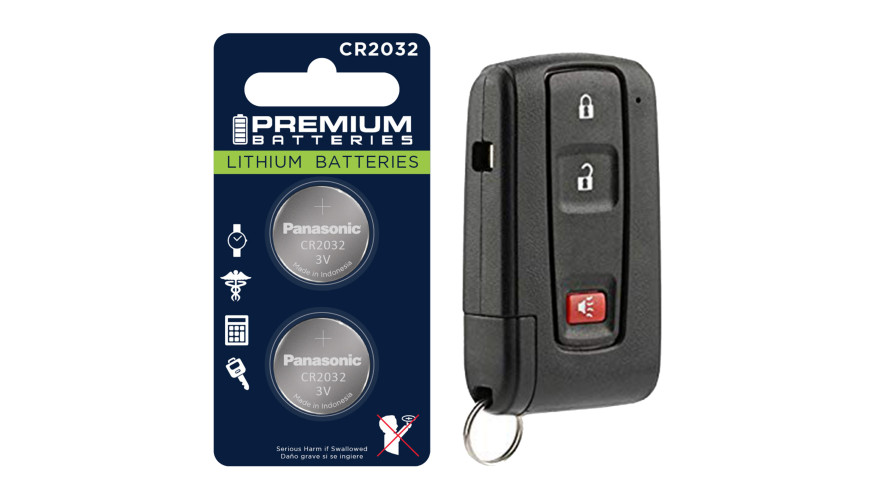
In this complete guide, we’ll show you how to choose the right replacement key shell for your car and why the Panasonic CR2032 battery is a trusted choice to keep your key fob performing reliably.


Part 1: How to Choose the Right Car Key Shell

Think of your key shell as a protective layer. It shields the sensitive electronics inside — the buttons, circuit board, and transponder chip — all of which are essential to operating your vehicle. When the case begins to wear down or fall apart, it’s time to replace it.

1. Know Your Car's Make, Model, and Year

Key shells are made to fit specific car models and years. For instance:

Flip key shells for Opel are commonly used on models from 2010 to 2024.

Audi smart key shells are dependent on the platform code (like A3 8Y or A4 B9).

Consult your owner's manual or use a compatibility tool like this one to confirm fitment.

2. Match the Key Blade

Blades come in various formats like HU162, VA2, or HU100. Even a slight variation in shape or groove pattern can render the key useless in your ignition or door locks. Carefully compare the blade on your current key to the one listed for any replacement shell.

3. Button Layout and Functionality

Make sure the number and positioning of buttons on the replacement shell matches your original. If not, the rubber pads may not line up with the contact points on your key’s circuit board, making the buttons unresponsive.

4. Interior Design and Compatibility

The outside might look the same, but inside layouts often differ. Ensure that your circuit board, battery slot, and chip all fit securely inside the new shell. Misalignment can cause rattling, failure to start the car, or buttons that don’t function correctly.

5. Material Quality

Avoid very cheap replacements with thin plastic and soft rubber. A good quality shell should be durable, with solid construction and tactile buttons that don't wear out quickly. For example, this Opel flip key shell combines strength with excellent fit.


Part 2: Why We Recommend Panasonic CR2032 Batteries

When your key fob starts failing — maybe the range drops or it takes multiple presses to unlock — chances are the battery is low. Many car owners replace the shell without considering the battery, only to find the problem persists.

Understanding the CR2032

The CR2032 is a 3-volt lithium coin battery, commonly used in remote keys and small electronic devices. It’s compact, stable, and specifically suited for low-power, long-term applications.

What Makes Panasonic CR2032 Stand Out?

Panasonic’s version of the CR2032 is known for its consistency and reliability. It offers:

A stable voltage output, ensuring your key communicates with your car effectively

Longer life compared to many generic brands

Resistance to leaks, which protects internal circuits from corrosion

Choosing a battery from a trusted manufacturer can save you from unexpected failures, especially in colder climates where battery performance matters most. We recommend the Panasonic CR2032 battery for its excellent balance of performance and reliability.


Refreshing Your Car Key: A Practical Approach

If your car key is showing signs of age, it's usually best to replace both the shell and the battery. The process is simple:

Open the old shell carefully, using a flat tool if needed.

Remove the circuit board, chip, and battery.

Clean the components gently with a dry brush.

Place them into the new shell, ensuring alignment.

Insert a fresh CR2032 battery.

Close and secure the new shell.

After completing these steps, your key should be more responsive, look better, and feel sturdier in your hand.

Related Posts

How to Upgrade Your Car Key: A Step-by-Step Guide

How to Upgrade Your Car Key: A Step-by-Step Guide

Upgrading your car key can significantly improve your vehicle’s security and make your daily routine more convenient. Whether you’re upgrading from a basic key to a remote key or stepping up to a smart key, this guide will take you through the entire process, step by step, ensuring a smooth transition. Understanding Your Key Type Before you start the upgrade process, it’s important to know which type of key you currently have. Here are the most common key types: Traditional Metal Keys : These are basic, mechanical keys, common in older vehicles. They don’t have any electronic components. Transponder Keys : These have an electronic chip inside the key head that communicates with the vehicle’s computer system for added security. Remote Keys : These keys have buttons to lock/unlock the doors remotely and usually have a physical blade as a backup. Understanding your current key type will help guide your decision on the best upgrade path. Choosing the Right Upgrade Once you know what type of key you have, you need to decide what features you want in your upgraded key. Some options to consider are: Remote Locking : Allows you to lock/unlock the doors from a distance. Keyless Entry : Lets you unlock the car without taking the key out of your pocket. Smart Key : Offers advanced functions such as proximity unlocking, push-button start, and remote engine start. Take some time to research the options available for your specific car model. Many car manufacturers offer compatible upgrades for different key types, so it’s important to consult your dealership or a trusted locksmith for recommendations. Gathering What You’ll Need Before starting the upgrade process, make sure you have the following materials: The New Key : This could be a transponder key, remote key, or smart key. Your Original Key : You’ll need this as a reference throughout the process. Key Programming Device : Some keys require a special device to pair the key with your car. Car Manual or Programming Guide : It’s always a good idea to have your car’s manual handy for specific instructions. Having everything ready will make the process much smoother. Step-by-Step Upgrade Process Purchase the New Key Start by purchasing your new key. You can buy it from your car’s dealership, a certified locksmith, or a trusted online retailer. Make sure that the key is compatible with your vehicle’s make and model. Transfer Electronics (if necessary) If your new key is just a shell, you will need to transfer the internal components from your old key. This includes the transponder chip and, if applicable, the key blade. Be careful when transferring the electronics to avoid any damage. Program the Key Programming the new key is crucial for it to work with your vehicle. Here’s a general guide: Insert the original key into the ignition and turn it to the ON position. Quickly remove the original key and insert the new key. Turn the new key to the ON position and wait for the security light to turn off. This might take a few minutes. Test the New Key After programming, it’s important to test the new key to ensure everything works properly. Check the following functions: Locking and unlocking the doors Starting the engine Any additional functions like remote trunk opening or proximity unlocking Troubleshooting Common Issues If your new key isn’t working as expected, don’t worry! Here are some common problems and their solutions: Key Not Recognized : Check if the transponder chip is properly placed in the key. Key Doesn’t Start the Car : Double-check the programming steps to ensure everything was done correctly. Buttons Don’t Work : Verify that the battery in the new key is properly installed and functional. If the problem persists, it’s best to consult a professional locksmith or visit your dealership for further assistance. Upgrading your car key is an excellent way to improve both the security and convenience of your vehicle. By following these steps, you’ll be able to transition smoothly to your new key. If you run into any issues, don’t hesitate to reach out to a professional locksmith who can help you along the way. Enjoy the benefits of your new car key and the added peace of mind that comes with enhanced security.

Programming Your Car’s Keyless Remote: A Simple Guide for Every Car Owner

Programming Your Car’s Keyless Remote: A Simple Guide for Every Car Owner

When it comes to convenience, car keyless remotes have revolutionized the way we interact with our vehicles. No more fumbling with traditional keys or worrying about locking yourself out. With just a push of a button, you can lock, unlock, and even start your vehicle. But what happens when your keyless remote stops working, or when you need to program a new one? Here’s a simple guide to help you program your car's keyless remote, regardless of your vehicle's make or model. Understanding Keyless Remotes Before jumping into the programming process, it’s important to understand what a keyless remote is and how it works. Essentially, a keyless remote allows you to interact with your vehicle without needing to physically insert a key. Instead of using a traditional metal key, your car’s electronic system communicates wirelessly with the remote, allowing you to lock, unlock, and sometimes even start your vehicle, all with the push of a button. These remotes typically use a radio frequency to communicate with your car, sending a signal that’s encrypted for security. Most modern cars use transponder technology, which makes the system more secure and resistant to hacking or copying. This means that the remote must be properly programmed to your vehicle’s system to function correctly. When Do You Need to Program a Keyless Remote? There are several situations in which you might need to program your keyless remote: Replacing a Lost or Damaged Remote : If you’ve lost your keyless remote or it’s no longer functioning properly, you’ll need to get a replacement. This may require programming the new remote to sync with your vehicle. Adding a New Remote : If you’ve bought an additional keyless remote for your car (for a spouse, child, or other family member), you’ll need to program it so that it works with your vehicle. Battery Replacement : Sometimes, replacing the battery in your remote can cause the programming to reset, meaning you’ll need to reprogram the remote for it to work again. Changing or Resetting Vehicle Settings : Occasionally, vehicle settings or remotes can be reset or reprogrammed as part of regular maintenance, requiring you to program new or additional remotes. How to Program Your Car’s Keyless Remote Programming a keyless remote is easier than you might think, and in most cases, it can be done by following a few simple steps. The process varies slightly depending on the make and model of your car, but here’s a general overview of the steps involved: Get Your New or Replacement Remote : Ensure that your remote is compatible with your car’s system. If you're not sure, you can check with your car's manufacturer or an authorized dealership. Some remotes require specific codes to be programmed. Sit Inside Your Vehicle : For safety and security reasons, most cars require you to be inside the vehicle while programming the remote. Insert the Key in the Ignition : Insert the key into the ignition and turn it to the "ON" position without starting the engine. For cars with push-to-start systems, you may need to press the start button without pressing the brake pedal. Activate the Programming Mode : Depending on your car’s system, you’ll need to follow a sequence of steps to enter programming mode. This could involve turning the key on and off several times, or pressing certain buttons in a specific order. Refer to your vehicle’s manual for the exact steps, as the process can differ from one model to another. Program the Remote : Once your car is in programming mode, you’ll need to press the button on your keyless remote that you want to program. Usually, you’ll hear a chime or see the lights flash, indicating that the remote has been successfully programmed. Some cars may require you to press the button several times to ensure proper synchronization. Test the Remote : After programming, test the remote to make sure it works properly. Try locking and unlocking the doors or starting the engine. If everything works as expected, you’re done! Exit Programming Mode : To finish the process, simply turn off the ignition and remove the key. This should exit programming mode. If you have additional remotes to program, repeat the steps above for each one. What to Do if Programming Doesn’t Work While programming a keyless remote is usually a straightforward process, there are instances where things don’t go as planned. If your remote isn’t syncing with your car after following the steps, here are a few troubleshooting tips: Check the Battery : If the remote’s battery is dead or weak, it won’t transmit the signal to your car. Replace the battery and try programming again. Verify the Compatibility : Make sure that the remote is compatible with your vehicle’s make, model, and year. Some vehicles require special remotes that can only be programmed by the manufacturer or an authorized locksmith. Reset Your Vehicle’s System : In some cases, you might need to reset the car’s system to clear previous programming attempts. Check your owner’s manual or consult a professional for assistance. Consult a Professional : If you continue to have issues, it might be time to visit a dealership or a certified locksmith. These professionals have the tools and experience to program the remote correctly and ensure everything works seamlessly. Why Programming Your Keyless Remote Is Important Programming your keyless remote is a simple but important task that helps ensure your car’s security and convenience. By understanding how the process works and what to do if things go wrong, you’ll be able to troubleshoot and solve any issues quickly. Whether you’re replacing a lost remote or adding a new one to your collection, knowing how to program your remote saves time and money compared to visiting a dealership or locksmith. With the increased reliance on keyless remotes for unlocking and starting vehicles, it’s essential for every car owner to be familiar with this process. By keeping your remote in good working condition and knowing how to program it when necessary, you’ll enjoy a smoother, more efficient experience with your vehicle.

How to Choose the Correct Key for Your Westfalia Towbar

How to Choose the Correct Key for Your Westfalia Towbar

Westfalia towbars are a common choice for many car owners due to their reliability and ease of use. However, because you may use your Westfalia towbar key sporadically throughout the year, it’s not uncommon to misplace it, often at the most inconvenient times—like when you're about to go on vacation. If you've lost your key , you might not know the number of the key you need to order a replacement. Fortunately, there is a way to determine this, depending on whether your towbar lock has a 3-digit or a 5-digit number. Step 1: Check the Number on Your Towbar Lock The first step is to inspect your towbar lock to see if it has a 3-digit or 5-digit number. Here’s what to do next: Sample picture of how 5-digits lock number looks like. If you have a 3-digit number: Unfortunately, the key code remains unknown based on this number alone. We can only manufacture a new key if you have at least one original key and can provide us with the W** or 2W** code from it. If you have a 5-digit number: You're in luck! You can easily determine the correct key code. The key code is based on the last two digits of the 5-digit lock number, prefixed with "2W". Step 2: Calculate Your Key Code If your towbar lock has a 5-digit number, simply ignore the first three digits and use the last two digits. Prepend "2W" to these digits to form the key code. For example, if the code on your lock is 33322 , then your key code is 2W22 . This code will be the number you provide when ordering a replacement key. Even if your 5-digit lock code starts with a different set of three digits, the method remains the same—ignore the first three and focus on the last two digits. For your convenience, we include our key code generator below. What to Do If You’ve Lost All Your Keys If you have lost all your keys and only have the 5-digit number on the lock, you can still determine the correct key using the method described above. Unfortunately, if your lock only has a 3-digit number, the specific key code cannot be determined based on the number alone. Remember, the key code is crucial for obtaining a replacement key. If the towbar was manufactured after 2008, the 5-digit code on the lock cylinder will allow you to identify the correct key. Simply use the last two digits and prefix them with "2W" to get the key code. If you're ever unsure, it's always a good idea to reach out to the manufacturer or a professional who can assist in identifying the correct key. Conclusion Choosing the correct key for your Westfalia towbar is straightforward if you know what to look for. By following these steps, you can quickly determine the correct key code and ensure you're never stuck without access to your towbar when you need it most. Be sure to keep your key code information safe, and consider having a spare key made to avoid future issues. Click Here To Order Your Westfalia Towbar Key >>

How to Properly Maintain Your Car Keys and Lubricate Locks: A Complete Guide

How to Properly Maintain Your Car Keys and Lubricate Locks: A Complete Guide

Car keys and locks are everyday essentials that we often take for granted—until they malfunction. From ensuring the longevity of your car keys to properly lubricating locks for smooth operation, maintenance plays a vital role in avoiding inconvenience and costly repairs. In this guide, we explore how to care for your car keys and master the art of lock lubrication. Common Issues with Car Keys and How to Prevent Them Car keys are more than just tools; they’re lifelines to your vehicle. Whether you have a traditional metal key or an advanced smart key, these essential devices are prone to wear and tear. Understanding common problems and their solutions can save you time and stress. 1. Worn-Out Key Blades Over time, the metal blades of traditional car keys can become worn, making it difficult to start your car. This is especially common in keys used frequently or roughly. To prevent this, avoid using your car key for tasks like opening packages or prying objects. 2. Weak Key Fob Batteries For those with remote or smart keys, a weak battery is a common issue. A fading signal or difficulty locking/unlocking your car remotely are signs it’s time for a battery replacement. Replacing the battery every 1-2 years can help maintain consistent performance. 3. Scratched or Damaged Smart Keys Smart keys have sensitive electronics that can be damaged by rough handling or exposure to extreme temperatures. Always store your key in a protective case and keep it away from direct sunlight or freezing conditions. Pro Tip: Always have a spare key on hand. This not only saves time during emergencies but also reduces the wear on your primary key. Why Locks Need Regular Lubrication Locks are intricate mechanisms designed to provide security. However, dirt, grime, and regular use can cause them to stick or malfunction. Lubrication ensures smooth operation and prevents long-term damage. How Locks Deteriorate Locks endure constant exposure to the elements, which makes them vulnerable to dirt, dust, and moisture. Over time, these factors can lead to stiffness, making it difficult to turn the key. If left unchecked, the lock may become entirely unusable, requiring costly replacement. Choosing the Right Lock Lubricant Not all lubricants are created equal, and choosing the right one is crucial for maintaining your locks. Here are the best options: Graphite Powder This dry lubricant is a top choice for locks. It doesn’t attract dust and provides smooth operation without residue build-up. Silicone Spray Silicone-based sprays offer moisture resistance and work well for both interior and exterior locks. Avoid over-applying, as excess lubricant can attract grime. Avoid Oil-Based Lubricants Products like WD-40 may seem convenient but are not ideal for locks. They can attract dirt and worsen the problem over time. Step-by-Step Guide to Lubricating a Lock Follow these steps to keep your locks functioning flawlessly: Clean the Lock Begin by removing visible dirt and debris using a soft brush or compressed air. This ensures the lubricant can reach internal components effectively. Apply Lubricant Insert the nozzle of your lubricant into the keyhole and spray or apply a small amount. If using graphite powder, gently squeeze the bottle to distribute the powder evenly. Insert and Turn the Key Insert your key and turn it several times to distribute the lubricant throughout the lock mechanism. Test the Lock Check the lock’s operation by locking and unlocking it multiple times. If it still feels stiff, reapply a small amount of lubricant. Pro Tip: Lubricate locks every 6-12 months, or more frequently if they’re exposed to harsh weather conditions. Maintenance Tips for Long-Term Performance 1. Protect Outdoor Locks For locks exposed to the elements, such as gates or sheds, consider using a lock cover to shield them from rain and snow. Regularly inspect and lubricate these locks to prevent rust and corrosion. 2. Store Spare Keys Properly Spare keys should be kept in a safe, dry place. Avoid leaving them in areas with high humidity, as moisture can lead to rust on metal keys. 3. Address Issues Early If you notice stiffness or difficulty turning a key, address the issue immediately. Ignoring minor problems can lead to complete lock failure. The Global Perspective on Lock and Key Maintenance Different regions face unique challenges when it comes to maintaining locks and keys. In cold climates, freezing temperatures can cause locks to seize, requiring specialized de-icing sprays. In humid or coastal areas, locks are more prone to rust and may need frequent lubrication to combat corrosion. Meanwhile, digital locks are becoming increasingly popular in urban areas worldwide. These systems require their own maintenance, such as software updates and battery replacements, to ensure optimal functionality. A Little Maintenance Goes a Long Way Caring for your car keys and locks is a small investment of time that can save you from major inconveniences. By taking preventative steps like lubricating locks and protecting your keys, you can ensure their longevity and performance. Take a moment today to inspect your keys and locks. Are they in optimal condition? If not, a quick round of maintenance can make all the difference. For more insights on maintaining your everyday essentials, explore our other articles and unlock the secrets to hassle-free living.

Chat with us